Guide
How to hide videos on iPhone, and what’s different for video
Open the video in Photos, tap the More button, then tap Hide. It leaves your Library and the Videos album for the locked album under Utilities, just as a photo would. What differs for video comes after: a locked note can’t hold one, screen recordings are videos you may forget about, with Optimize Storage on your phone may keep only a smaller copy, and a vault app may charge for video. If a moved clip won’t play, check the file and that storage setting first.

On this page
Move a video to the locked album
- In Photos, tap Collections, then Videos under Media Types, to see only your clips.
- Open the video, tap the More button, then tap Hide, and confirm.
- For several clips, tap Select, tap each one, then tap the More button and tap Hide.
Apple’s iPhone guide uses the same steps for a photo or a video. Apple’s article on the album says a moved item stops showing in the Library and in other albums, so the clip also leaves Videos under Media Types. On an iOS 27 Simulator in October 2026, the Videos count dropped by one when a clip moved.
Open the Hidden album under Utilities, tap View Album and unlock it to watch the clip again. The lock works the same for photos and video, and its limits have a page of their own.
Four things that are different for video
A locked note can’t hold one. Apple’s Notes article lists video among the things that stop a note from being locked. A note works for a photo beside some text, never for a clip.
Screen recordings count. Apple’s screen recording guide says recordings save to your photo library on their own, in Screen Recordings under Media Types. A recording of a banking app or a private chat sits in your Library like any other clip until you move or delete it.
The phone may hold only a small copy. With Optimize Storage on, Apple’s iCloud Photos article says your phone keeps space-saving versions while the originals stay in iCloud, ready to download over Wi-Fi or cellular. Moving a long clip into another app can mean waiting for the full file to come down first.
Copies travel further. A clip you sent in Messages, or put in a shared album, stays where you sent it. Moving your own copy changes nothing there. Where private photos still show up lists those places.
Keep videos in a vault app
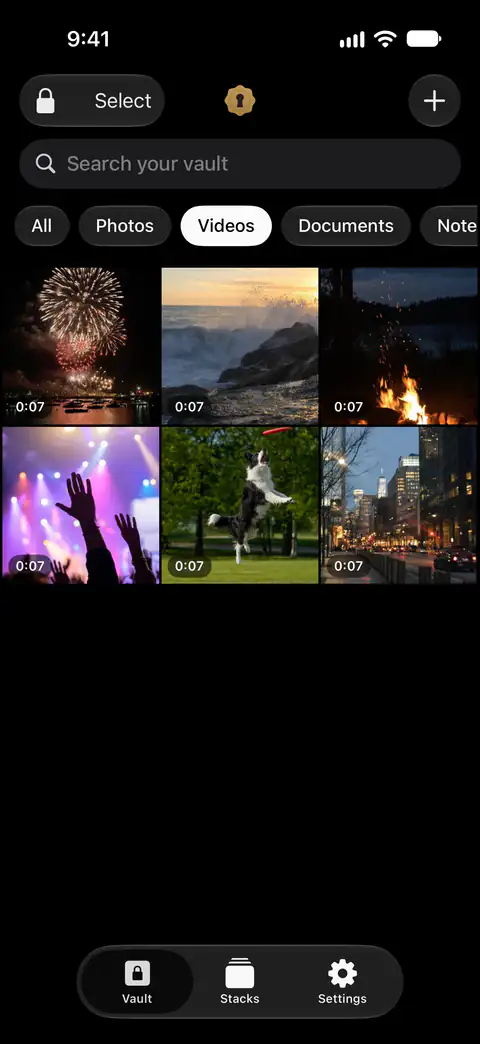
In Sealed, video is part of the paid plan. On the free plan you can add photos. Videos, documents, notes and records need Sealed Pro. Sealed Pro Yearly costs $39.99 a year, and new subscribers get a 7-day free trial. Sealed Pro Lifetime costs $79.99, paid once, with no subscription and nothing to renew.
- Add the clip from Photos. Sealed imports only the photos and videos you choose, and deletes the originals in Photos only when you ask.
- Let the vault check long files. Large files are encrypted in chunks, and Sealed refuses a file that has been changed, reordered or cut short.
- Trim it there, if you like. The photo editor is free, video trimming is part of Sealed Pro, and both work without anything leaving the vault.
- Or record straight into the vault, so the clip never reaches Photos. The private camera captures photos and videos directly into your encrypted vault. The private camera is part of Sealed Pro.
- Let it remove the original. After you import photos, Sealed asks whether to delete the originals from Photos or keep them, and says that deleted originals move to Recently Deleted in Photos.
If a video won’t play
Nothing on Apple’s pages says a clip plays differently once it is in the locked album. When one won’t open, work through these:
- The file. Apple’s media article says a file that won’t play may be damaged or in a format the device doesn’t support, and suggests checking for software updates.
- The storage setting. With Optimize Storage on, the original is in iCloud (Apple’s iCloud Photos article). Connect to a network and give it time to download.
- A clean copy. In your Library, tap Select, choose the clip, tap the Share button, then tap Export Unmodified Originals and save it to Files (Apple’s download article).
If the problem is opening the album rather than the clip, the checklist on the album’s lock page covers a missing or locked album.
Where Sealed helps, and where it doesn’t
It helps keep clips behind a code of their own, and can film them so they never touch Photos. Sealed has a passcode of its own, a gate inside the app that is separate from your iPhone passcode. Sealed saves items to your photo library only when you export them.
It doesn’t take video on the free plan. On the free plan you can add photos. Videos, documents, notes and records need Sealed Pro.
It doesn’t remove the clip from Photos until you say so. Until you delete them, the originals stay in Photos, outside the vault.
It doesn’t reach copies you already sent. Your files never leave your iPhone unless you turn on iCloud backup or export them yourself. A clip in a chat or a shared album stays there.
It can’t let you back in without your passcode or your recovery key. Because your key never reaches us, we cannot recover your vault or reset your passcode for you.
For photos, and the other ways to keep a picture off the grid, see four ways to keep photos out of sight.
Questions and answers
Can I lock a video in Notes?
No. A locked note can’t hold video, a PDF, audio or tags. Apple says you can’t lock notes that have tags, PDFs, audio, video, or Keynote, Pages or Numbers documents, or notes you share with someone else.
Does Sealed take videos on the free plan?
On the free plan you can add photos. Videos, documents, notes and records need Sealed Pro. Sealed Pro lifts the photo limit and adds, among other things, videos, documents, notes, records, the private camera, voice memos, wireless transfer, Space Saver, the duplicate finder and video trimming.
Will a video play from the locked album?
Yes. Once you unlock the album, a clip in it opens and plays like any other. If one won’t, the checks on this page apply to any video.
Sources
What this page says about Sealed was checked against the app on .
- Apple iPhone User Guide, delete photos and videos or move them out of the Library (iOS 27) — read 13 Nov 2026; the same steps for a photo or a video, Select for several, unlocking the collection
- Apple Support, the Hidden album in Photos (article 104987) — published March 16, 2026, read 13 Nov 2026; moved items stay out of the Library and other albums
- Apple Support, How to lock or unlock notes on your iPhone or iPad (article 102537) — read 13 Nov 2026; a note with video can’t be locked
- Apple iPhone User Guide, Take a screen recording on iPhone (iOS 27) — read 13 Nov 2026; recordings saved to the photo library automatically, the Screen Recordings album under Media Types
- Apple Support, Set up and use iCloud Photos (article 108782) — published September 14, 2026, read 13 Nov 2026; Optimize Storage keeps space-saving versions on the device
- Apple Support, If a media file doesn’t open or play on your Apple device (article 102644) — published September 14, 2026, read 13 Nov 2026; damaged or unsupported files, software updates
- Apple Support, Download iCloud photos and videos (article 111762) — published April 10, 2026, read 13 Nov 2026; Export Unmodified Originals to Files
- Sealed on the App Store — the listing for the app this guide uses
Get Sealed
Sealed is free to download, and Sealed Pro is an optional in-app purchase.

Sealed: Private Photo Vault
Sealed is free to download, and Sealed Pro is an optional in-app purchase.