Feature
The decoy vault: a second passcode, a second vault
A decoy vault opens with a second passcode, and it is part of Sealed Pro. The decoy passcode opens a separate vault with its own content, and you fill it yourself: unlock with the decoy passcode and add items. Face ID and Touch ID always open your real vault: the decoy vault opens only with its own decoy passcode or decoy pattern. It shows a believable vault. It is not a second lock, and it can’t stop someone who knows to ask for both passcodes.

On this page
Setting it up, step by step
- To set up a decoy, open Settings, then Decoy Vault, and turn on Decoy PIN, which asks you to choose the decoy code.
- The decoy has to use the same passcode format as your real one and can’t be the same code, and if you change the format later the decoy is removed and you set it up again.
- If you unlock with a pattern too, set a decoy pattern on the same screen. Besides a decoy passcode, you can set a decoy pattern that opens the decoy vault, once you have a pattern of your own.
- Lock Sealed, then unlock with the decoy code. The vault you see is the decoy, empty at first.
- Add ordinary things: a few photos, a note, a record. An empty decoy tells a careful person as much as a locked one.
- Lock again and unlock with your real passcode, to check that your own vault is as you left it.
If your lock screen is the Cryptex or Knock, the decoy is a word or a rhythm instead. With the Cryptex or Knock as your lock screen, the decoy code is made on that lock’s own surface, as a word or a rhythm.
What someone sees with the decoy code
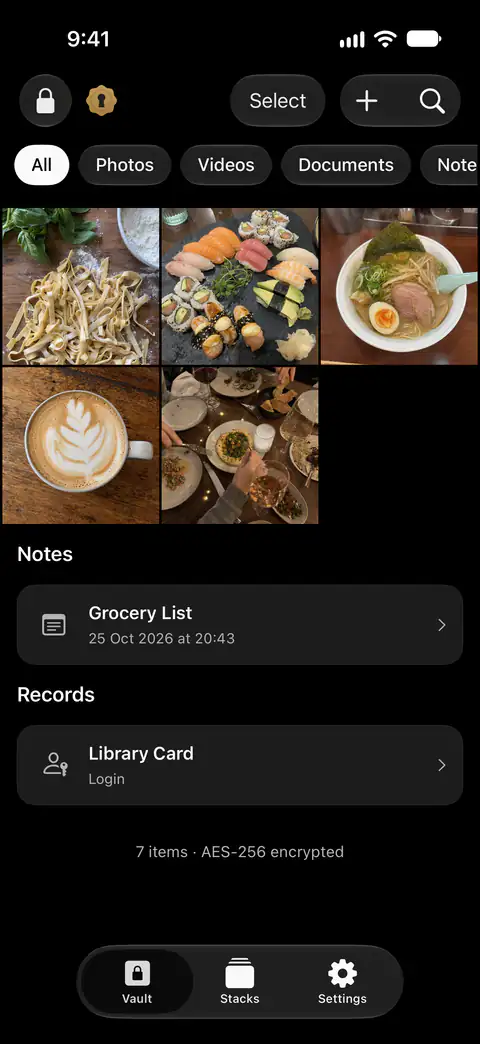
It is the same app: the same lock screen, the same tabs, the same grid. What is in it is only what you put in the decoy. Anything added while the decoy vault is open, such as photos, files, notes, records, stacks and camera shots, is saved in the decoy vault and not in your real one.
Settings is where it differs. In the decoy vault, Settings leaves out your plan and iCloud backup, Location Lock, Break-In Report, Decoy Vault, Transfer and Data & Storage, and the vault home leaves out the backup status line. Settings a person changes while in the decoy vault work during that visit and are put back when the vault locks.
What is underneath
Decoy items are kept in the same database as your real items, marked by a flag, and the decoy vault opens with the same vault key, so it is a filtered view and not a second encrypted store.
That has two practical effects. Items in the decoy vault are not part of your iCloud backup. Your passcodes, the decoy one included, stay on the iPhone where you made them, so a new iPhone starts without a decoy. After a move to a new phone you set the decoy up again, and refill it. The backup and restore page covers what a restore brings back.
With the other locks
- Dual Lock. With Dual Lock on, the decoy passcode opens the decoy vault without the Face ID step that your real passcode needs.
- Maximum Security. With Maximum Security on, even the decoy passcode needs a live Face ID or Touch ID match, because the vault key is only released by one.
- Wrong tries. Typing the decoy passcode counts as a correct passcode: it adds no failed attempt and starts no wait or break-in photo.
- A duress code. It opens this same decoy and also takes the real vault off the phone. It needs a decoy with something in it first: see the duress code page.
Where Sealed helps, and where it doesn’t
It helps when someone asks to look through Sealed on your phone and you would rather they saw a believable vault than your real one. The decoy passcode opens a separate vault with its own content, and you fill it yourself: unlock with the decoy passcode and add items.
It doesn’t do these things:
- Stop someone who knows to ask. The decoy vault is a published feature, on the App Store page and on this one. A person who knows about it can ask for the other passcode. A decoy vault opens with a second passcode, and it is part of Sealed Pro.
- Answer to your face. Face ID and Touch ID always open your real vault: the decoy vault opens only with its own decoy passcode or decoy pattern. If you rely on the decoy, turn face unlock off, so that a code is the only way in. In Settings, under Passcode & Unlock, you can turn Face ID or Touch ID Unlock off, and set, change or remove a pattern.
- Stand up to someone reading the phone’s storage. It is a filtered view, as above, not a second encrypted store. Decoy items are kept in the same database as your real items, marked by a flag, and the decoy vault opens with the same vault key, so it is a filtered view and not a second encrypted store.
- Look identical in Settings. A person who knows what the full Settings list shows may notice what the decoy’s list leaves out, as above. The guide to decoy vaults lists the other things to check.
- Tell you someone used it. Break-in alerts react only to wrong tries, and the decoy code is a right one.
- Choose your real lock for you. See Face ID, passcode or pattern: which lock is safest?
Questions and answers
Does the decoy vault use a different key?
Decoy items are kept in the same database as your real items, marked by a flag, and the decoy vault opens with the same vault key, so it is a filtered view and not a second encrypted store. Your vault key is a random 256-bit key. It is not made from your passcode.
Can Face ID or a pattern open the decoy vault?
Face ID and Touch ID always open your real vault: the decoy vault opens only with its own decoy passcode or decoy pattern. Besides a decoy passcode, you can set a decoy pattern that opens the decoy vault, once you have a pattern of your own. With Maximum Security on, even the decoy passcode needs a live Face ID or Touch ID match, because the vault key is only released by one.
Does the decoy vault come back after a restore on a new iPhone?
Items in the decoy vault are not part of your iCloud backup. Your passcodes, the decoy one included, stay on the iPhone where you made them, so a new iPhone starts without a decoy.
Does typing the decoy code set off a break-in alert?
Typing the decoy passcode counts as a correct passcode: it adds no failed attempt and starts no wait or break-in photo.
Sources
What this page says about Sealed was checked against the app on .
- Sealed on the App Store — the listing, which names the decoy vault
Get Sealed
Sealed is free to download, and Sealed Pro is an optional in-app purchase.

Sealed: Private Photo Vault
Sealed is free to download, and Sealed Pro is an optional in-app purchase.