Comparison
Sealed vs SPV (Secret Photo Vault): what if the phone is lost?
The difference is what happens if the phone goes. The other app’s listing says photos stay on the phone, nothing goes to a server, and deleting the app deletes them. It mentions no backup, no encryption and no way back from a forgotten PIN. Encrypted iCloud backup is free. Backup goes to your own iCloud account, not to a server of ours. If you forget your passcode, your recovery key lets you set a new one. The other app runs on older iPhones, while Sealed needs iOS 17.0 or later.

On this page
Disclosure. Sealed is made by Loopware LLC. We read SPV’s App Store listing and store page on 13 November 2026, and did not install or test it. SPV is sold by Maple Labs as SPV - Secret Photo Vault; it is a different app from Keepsafe, whose App Store name also starts with those words.
The question that sets them apart
Ask each app what happens to your photos if the phone is lost, broken or wiped.
SPV’s listing gives a plain answer: it keeps no photos or data on any server and uses only the phone’s internal storage. If you delete the app, your photos and data are deleted with it, so the listing tells you to export them to your photo gallery first (listing). It doesn’t mention a backup, so it describes no way back if the phone itself is gone.
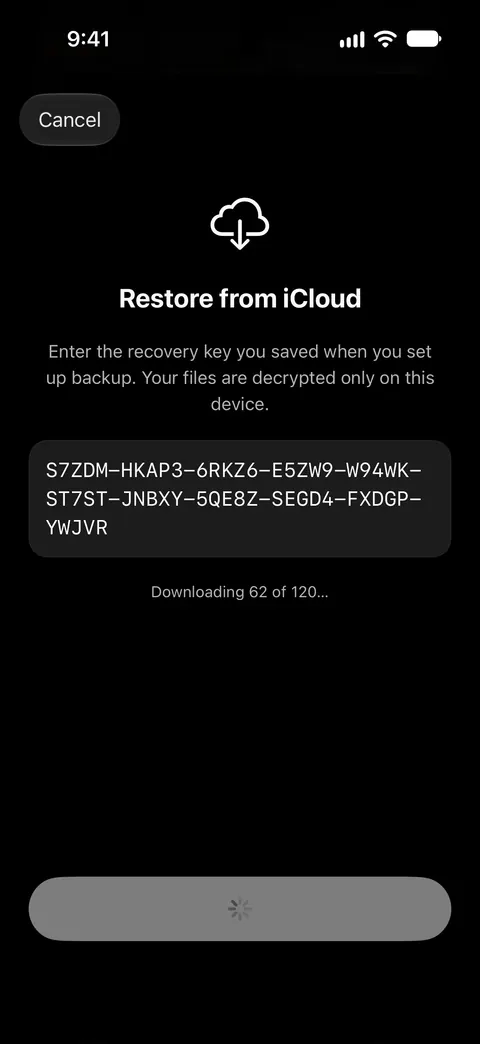
Sealed keeps an encrypted copy off the phone, and the recovery key brings it back. Encrypted iCloud backup is free. Files, names, notes and record fields are encrypted on your iPhone before they are uploaded, so iCloud receives only ciphertext. You can restore your vault on a new iPhone from your backup, with your recovery key. Our page on whether deleting a vault app deletes your photos covers how other vaults handle this.
Side by side
| Sealed | What SPV’s listing says |
|---|---|
| Where files live. Your files never leave your iPhone unless you turn on iCloud backup or export them yourself. | Only in the phone’s internal storage, with nothing on a server. Listing. |
| Backup. Backup goes to your own iCloud account, not to a server of ours. Encrypted iCloud backup is free. The first time you save your recovery key, Sealed also turns on iCloud Backup, which is free. | Not mentioned in the listing. Listing. |
| Deleting the app. If you delete Sealed from an iPhone while iCloud Backup is off, the vault on that iPhone is deleted with it. Deleting the app doesn’t delete your iCloud backup: Delete iCloud Backup in Settings does. | Deletes the photos and data saved in it. The listing says to export first. Listing. |
| Forgotten passcode. If you forget your passcode, your recovery key lets you set a new one. Because your key never reaches us, we cannot recover your vault or reset your passcode for you. | Not described in the listing. Listing. |
| Encryption. Sealed encrypts every file with AES-256-GCM before it is saved. Each file gets its own random 256-bit key, and that key is sealed with your vault key. | Not stated. The listing never uses the word and names no cipher. Listing. |
| Unlocking. You can open Sealed with Face ID or Touch ID, a 4-, 6- or 9-digit passcode, a password or a pattern. | A PIN. The listing names no other way in. Listing. |
| What it holds. Records keep logins, 2FA codes, credit cards, bank accounts, IDs and passports, Wi-Fi networks, recovery codes, license keys, contacts and custom fields. On the free plan you can add photos. Videos, documents, notes and records need Sealed Pro. | Photos, videos, albums, contacts, passwords and a web browser. Listing. |
| Ads and tracking. Sealed has no ads and no tracking. Sealed contains no analytics or tracking SDKs, and it collects no data. | Its privacy label lists data used to track you, with third-party advertising among the purposes. Store page. |
| Plans. Sealed is free to download, and Sealed Pro is an optional in-app purchase. Sealed Pro Lifetime costs $79.99, paid once, with no subscription and nothing to renew. | A subscription by the week, the month or the year, the year with a free trial. The store page lists ten purchases, all named Premium. Listing, store page. |
A listing that is silent on a point doesn’t prove the app lacks it. It does mean you can’t check it before you install.
Where SPV is ahead
- Older iPhones. It runs on iOS 15.0 or later (store page). Sealed needs iOS 17.0 or later.
- Less to look after. Its listing describes a PIN and nothing else to set up (listing). Sealed asks you to keep a recovery key. Sealed asks you to save your recovery key before it turns backup on.
- A plain warning. Its listing says in one sentence that deleting the app deletes your photos (listing).
If you keep SPV
A vault that lives on one phone is only as safe as that phone. If the phone is lost or broken and you have no other copy, SPV’s listing describes no way back. So export the photos you can’t lose now and then, to Photos or a computer, and keep that copy somewhere you trust, above all before you change phones. Our guide to exporting photos from a vault app shows the usual ways. If you’d rather have no cloud copy at all, read an offline photo vault with no account first.
Where Sealed helps, and where it doesn’t
It helps if you want your photos to survive a lost or broken phone. You can restore your vault on a new iPhone from your backup, with your recovery key. The recovery key is the only way to decrypt an iCloud backup on a new iPhone. Read about the recovery key.
It helps if you want an app that names its encryption and shows no ads. Sealed encrypts every file with AES-256-GCM before it is saved. Sealed has no ads and no tracking.
It doesn’t run on an iPhone older than iOS 17. Sealed needs iOS 17.0 or later.
It doesn’t hold videos, contacts or passwords on the free plan. On the free plan you can add photos. Videos, documents, notes and records need Sealed Pro.
It doesn’t work without a key to keep. Anyone who has your recovery key and your iPhone or your iCloud backup can open your vault. Because your key never reaches us, we cannot recover your vault or reset your passcode for you.
Questions and answers
Does SPV back up my photos?
Its listing doesn’t mention a backup. It says photos are kept only in the phone’s own storage and deleted with the app, and tells you to export them to Photos before you delete it. Encrypted iCloud backup is free.
Is SPV encrypted?
Its listing doesn’t say: it never uses the word. That doesn’t prove the files are stored in the clear. It means the listing makes no claim you can check. Sealed encrypts every file with AES-256-GCM before it is saved.
Can I keep my vault on the phone only with Sealed?
Yes. Your files never leave your iPhone unless you turn on iCloud backup or export them yourself. The first time you save your recovery key, Sealed also turns on iCloud Backup, which is free. You can switch iCloud Backup off again in Settings, under Sync & Backup.
Sources
What this page says about Sealed was checked against the app on .
- Apple, Lookup record for SPV - Secret Photo Vault (id 1449239240), US storefront — the App Store description, seller, version 7.6.1 released 30 Aug 2026, iOS 15.0 or later, four languages. Read 13 Nov 2026
- SPV - Secret Photo Vault on the US App Store — the in-app purchases, the privacy label and the Compatibility section. Read 13 Nov 2026
- Sealed on the App Store — the listing for the app this page compares
Get Sealed
Sealed is free to download, and Sealed Pro is an optional in-app purchase.

Sealed: Private Photo Vault
Sealed is free to download, and Sealed Pro is an optional in-app purchase.